The problem: every invoice is typed twice
The supplier types the invoice into their system, sends it as a PDF or a photo, and then a warehouse clerk types it again into the warehouse system: item by item, with quantity and price, then compares it with the purchase order. This is what our warehouse clients complain about most, and it is where most mistakes happen: a transposed number, an item on the wrong line, or a price that changed without anyone noticing.
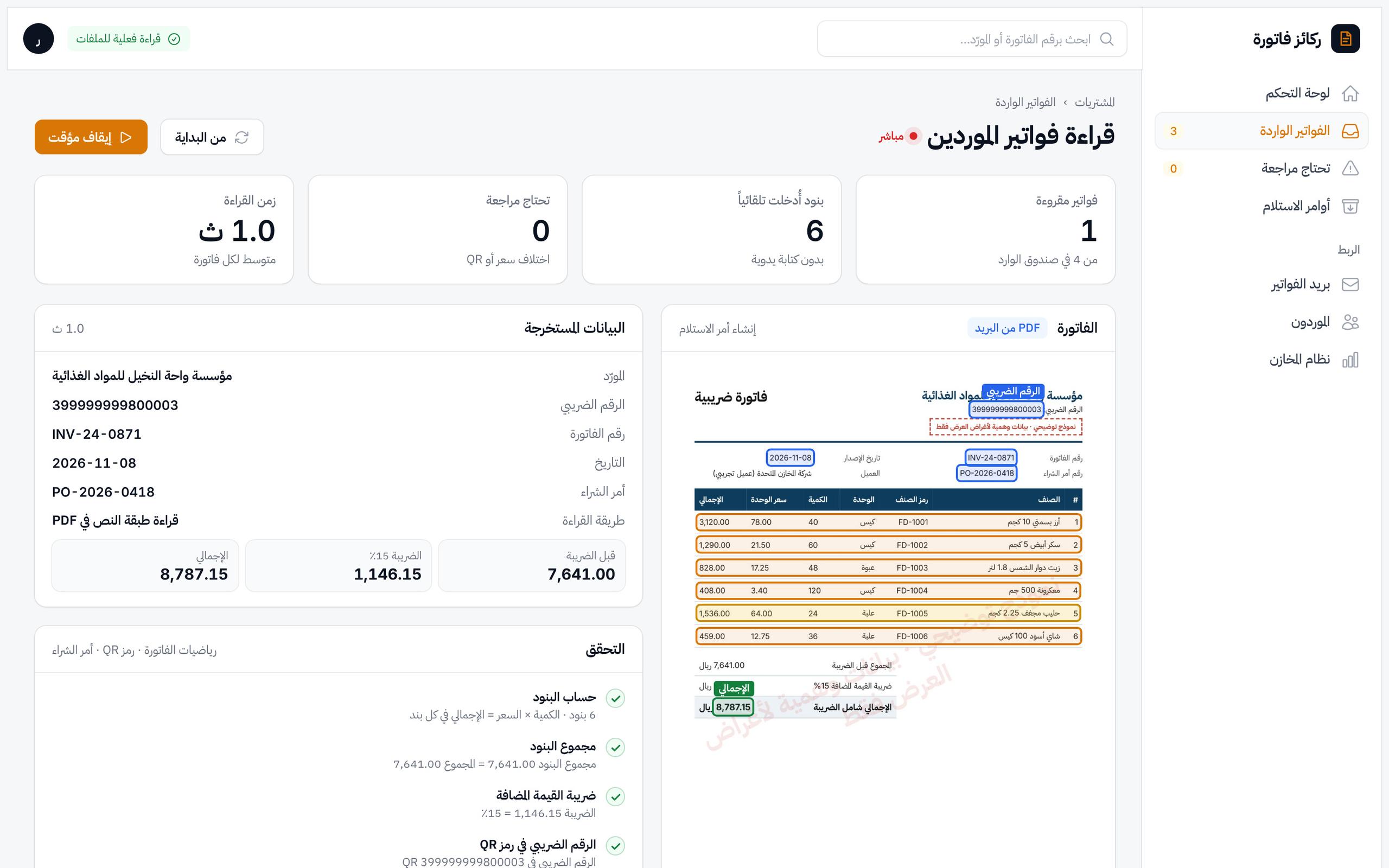
The idea behind Rakaiz Fatoora: the system reads and checks the invoice, then creates the goods receipt, and the clerk only reviews the exceptions.
The test: four invoices in four forms
We designed four sample invoices from fictional suppliers, each marked as for demonstration only, because real invoices carry client data we do not publish. We chose them to resemble what actually arrives: an Arabic PDF invoice from email, an English invoice scanned slightly crooked, a photo of a printed invoice taken by a delivery driver on a desk with uneven lighting, and a fourth invoice whose QR code total we changed so it differs from the printed total.
The result: 19 of 19 line items had their quantity, price and amount read correctly, the totals and VAT were correct on all four invoices, and the QR code was read on all four. A PDF invoice took under a second, the scan 3.5 seconds and the phone photo 2.9 seconds, all on an ordinary processor with no graphics card. Getting there meant solving four problems.
1. A PDF is not always text
The first invoice is a digital PDF, so we read the text straight from the file without OCR. Numbers and item codes came out clean, but some Arabic words came out with letters swapped, because of how joined Arabic letters are stored inside a PDF. So we do not rely on the item name as read: we match on the item code first, show the item name from the warehouse records, and keep the text as read underneath for review.
2. One degree of tilt breaks the table
The scanned invoice was tilted by less than one degree, which was enough for the engine to read the start of a line in one row and its end in the next, separating the item name from its numbers. We added a straightening step before reading: we try small angles and pick the one where the text lines are most clearly horizontal, and the rows came back whole. For the phone photo, we first find the edges of the paper and flatten it into a straight page, then even out the lighting before reading.
3. Numbers next to Arabic words
Reading the page in Arabic and English together gave correct line prices, but the totals written next to the Arabic word for riyal came out garbled. The fix is a second, English-only pass that we use for numbers and codes, while the Arabic words come from the first pass.
We also did not rely on column order to understand the numbers, because an Arabic table starts on the right and an English one on the left. Instead, in each row we look for three numbers that satisfy quantity × price = amount. The same idea finds the totals: a subtotal, a VAT figure equal to 15% of it, and a total equal to their sum. Any misread number breaks the equation, so we know the reading is wrong instead of entering it into the system.
4. The QR code: a reviewer that is hard to fool
Saudi tax invoices carry a QR code with the seller's name, VAT number, total and VAT amount. We read the code and compare it with what we read from the invoice. On the phone photo the usual reader did not decode it at first, so we added a second reader from the same OpenCV library and tried different image sizes until it decoded.
That comparison caught the fourth invoice: its printed total is SAR 1,406.45, but the QR code says 1,188.45. The invoice's own arithmetic is correct, and the difference only shows when it is compared with the code, so it was sent for review instead of getting a goods receipt.
The decisions: three different outcomes
- The scanned invoice: every line matched the purchase order, so the goods receipt was created automatically
- The PDF invoice: 24 tins of milk powder arrived out of 30 on the purchase order, so a partial receipt was created and the rest stayed open
- The phone photo: hand sanitiser at SAR 8.50 instead of 7.90 on the purchase order, so it went for review
- The fourth invoice: the QR total did not match, so it went for review
What if the supplier leaves out the item code?
We tried matching on the item name alone, without codes: 18 of 19 lines matched the right item in the warehouse records. The one that did not was the nitrile gloves on the phone photo, where the engine misread the first letter of the Arabic word. In that case the system does not guess; it sends the line for review, and over time it learns each supplier's names.
What we learned
- The invoice checks itself: quantity × price, the subtotal, VAT and the QR code are four layers of checks already present in every tax invoice
- Don't rely on column order: the equations work for Arabic and English invoices and any table design
- Prepare the image before reading it: flattening, straightening and evening out the light matter more than switching engines
- Test on the worst cases: our samples are fairly clean, while real invoices have stamps, handwriting and several pages; for those we add a vision language model and keep the same checks
Receiving lots of invoices?
See Rakaiz Fatoora, the Warehouse & Procurement System it works with, or get in touch and we will try the system on samples of your suppliers' invoices.